AI DRAWING REVIEWFOR ARCHITECTS
AI architectural drawing checks for coordination gaps, missing notes and potential building-regulation issues.
Upload your drawings. Review interactive findings. Make informed corrections before issue.
Part L — Window reveal cavity closure missing.
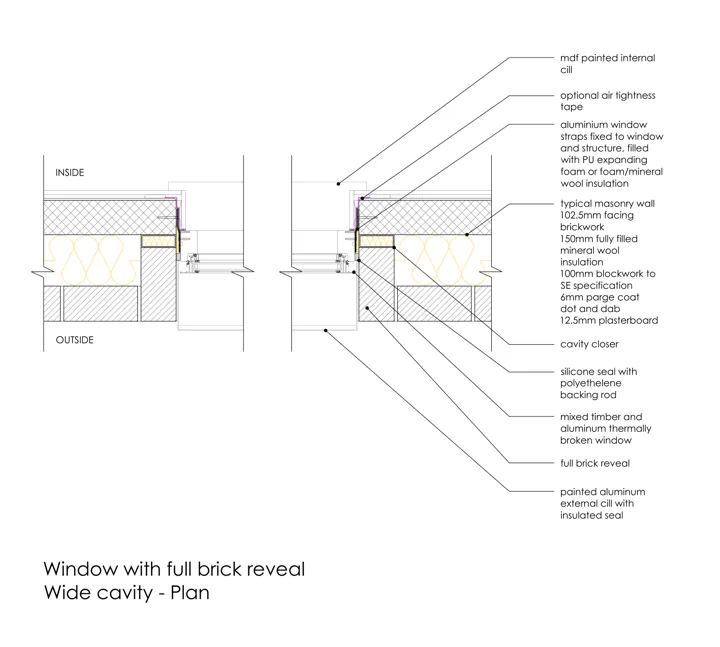
Window — Brick Reveal Plan
✓ Cancel anytime · ✓ Instant access · ✓ No lock-in
"Caught 9 issues in 10 minutes. Non-negotiable." — James T.
No setup time · Results in 10 minutes · Cancel anytime
Checking against building regulations in
UK active · Other jurisdictions in beta · Verify local requirements
Two Deliverables,
Every Single Check
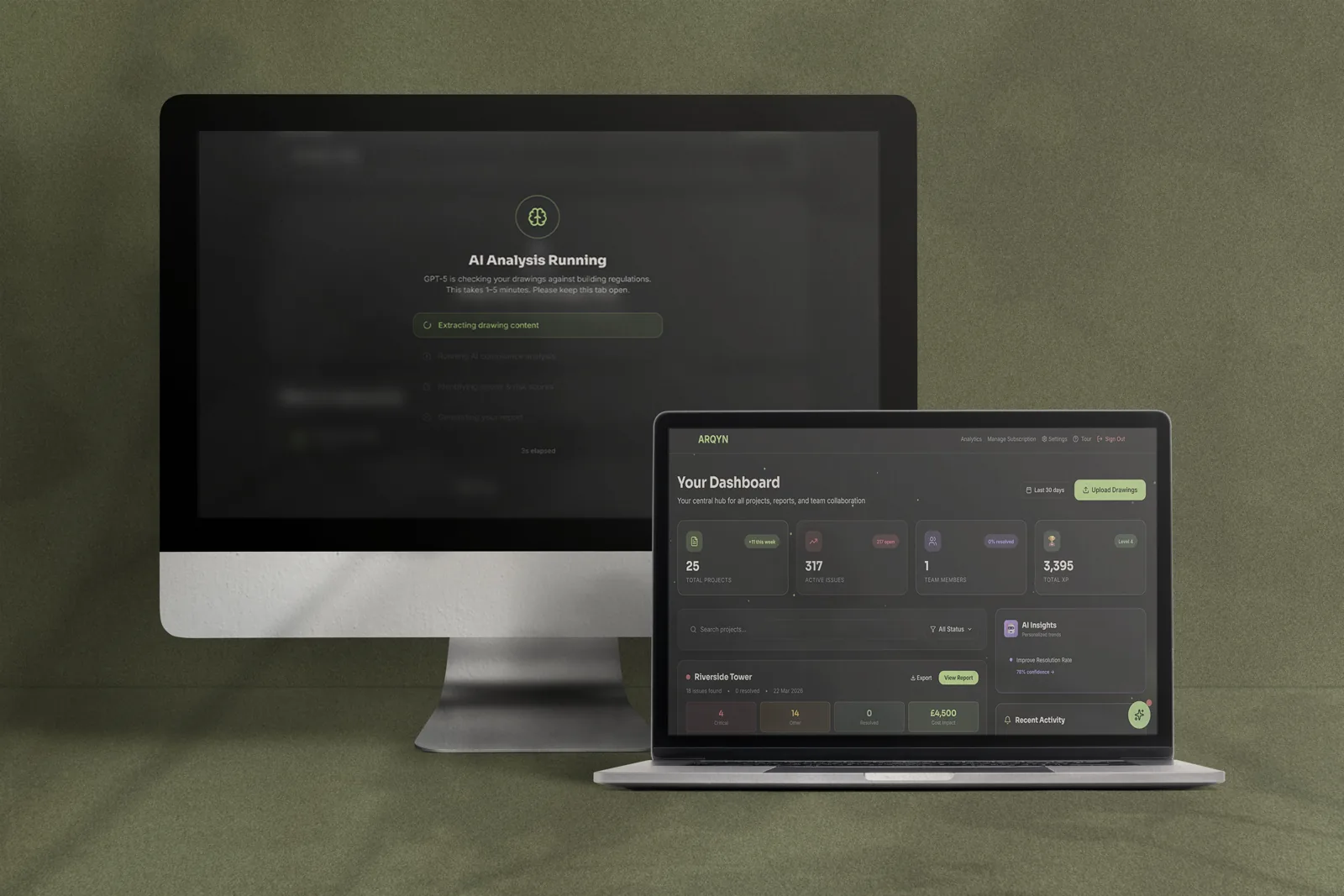
Real AI analysis. Real building regulation checks. Every drawing check produces both an interactive report and a colour-coded PDF — here is an example of each.
Member Dashboard
Your subscriber workspace
The dashboard you get from day one. Browse projects, inspect AI-flagged issues, check your compliance score, and manage team activity — exactly as your live account looks.
Preflight Report
What you get per drawing check
Every drawing check produces this. Open a real AI-generated compliance report — complete with colour-coded drawings, risk scores, regulation references, cost impact, and AI chat.
Every Issue Flagged.
Every Fix Delivered.
When ARQYN identifies a problem in your drawings, it doesn't just flag it — it delivers the correct construction detail from our library for you to download and use immediately. No searching. No waiting.
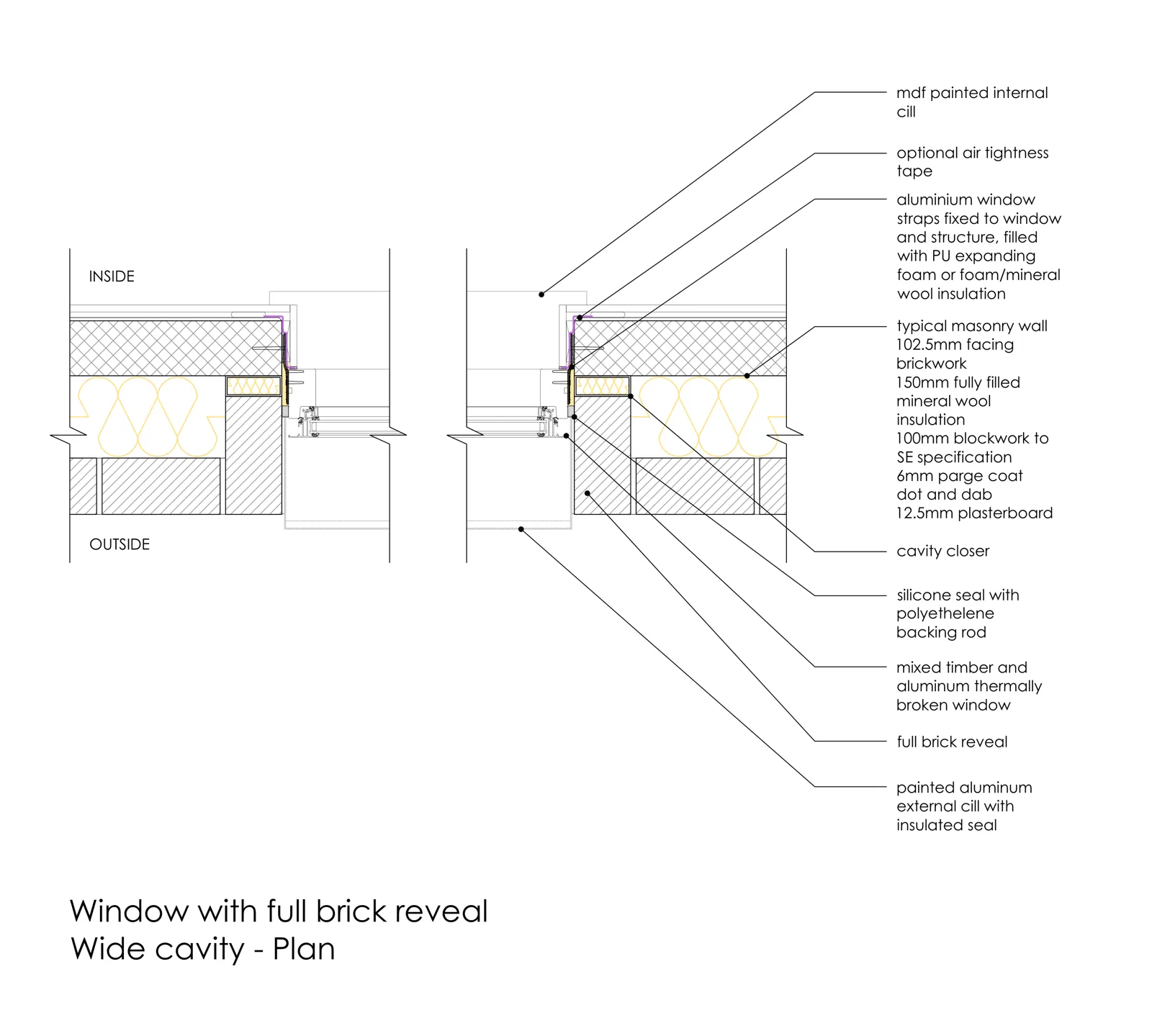
Window with Full Brick Reveal
Wide cavity plan — insulation, cavity closer, air tightness, and MDF cill all annotated.
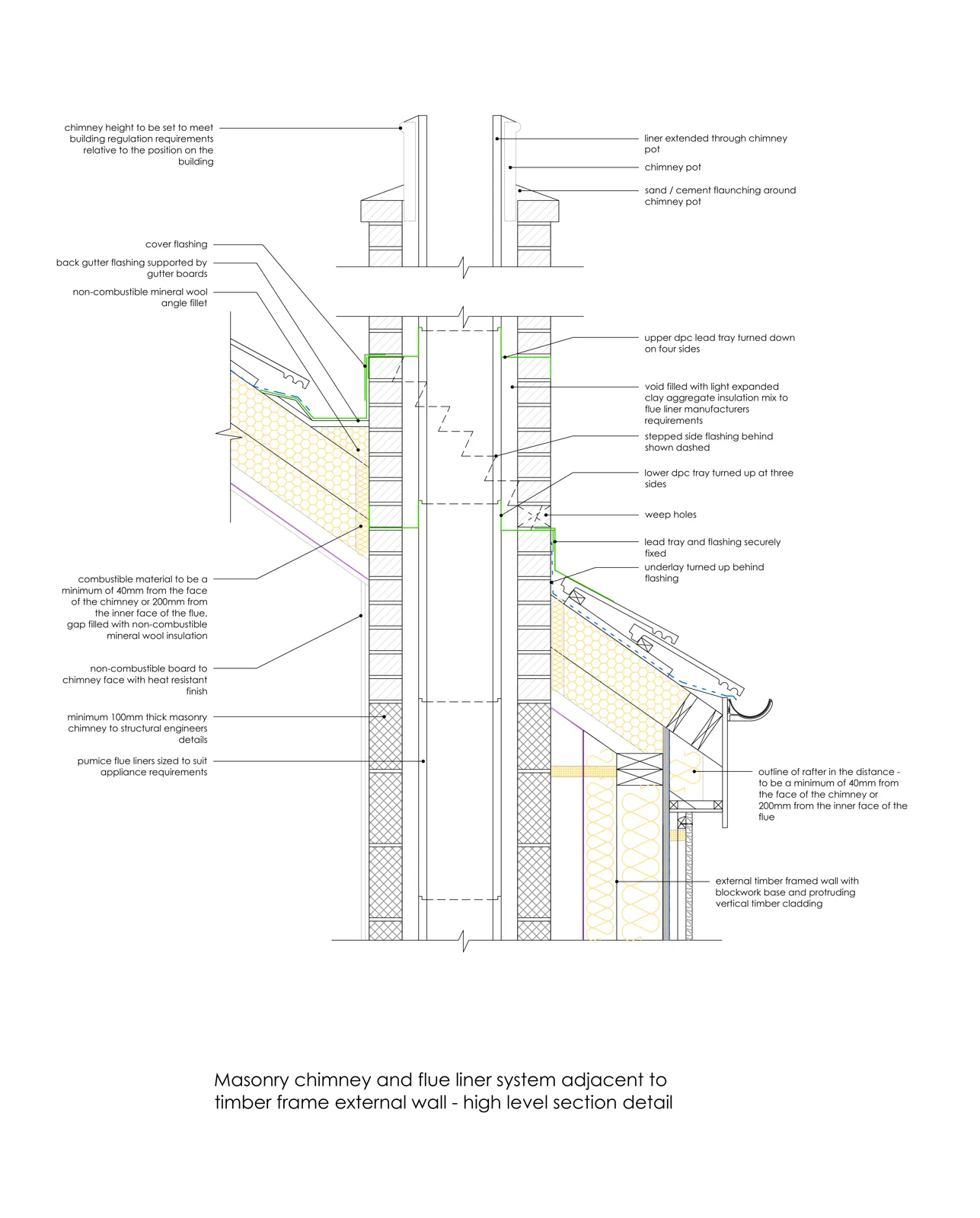
Masonry Chimney — Fire Compartmentation
High-level section showing DPC lead tray, mineral wool isolation, weep holes, and combustible clearances to Building Regs.
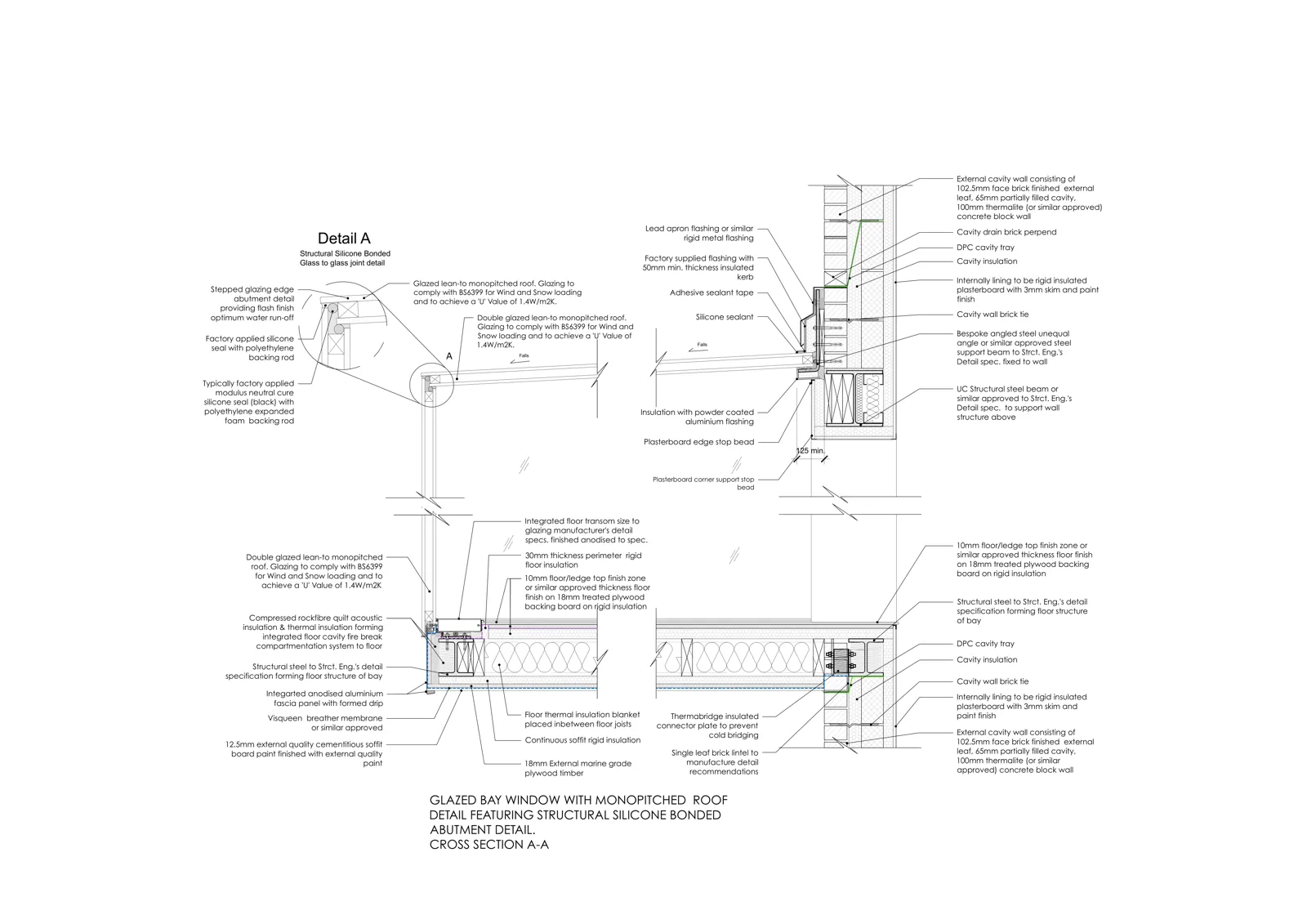
Glazed Bay Window with Monopitched Roof
Four details on one sheet — glass-to-glass joint, DPC cavity tray, structural steel, and full cross-section A-A with U-value notes.
The only preflight tool that fixes the issue for you
Each flagged issue in your report is matched to a relevant detail from the ARQYN Library — covering plan views, sections, elevations, and multi-detail sheets across the full range of building regulation issues.
What We Check For
AI scans every drawing for 200+ common architectural mistakes
Coordination Issues
High-priority fixes
Specification Gaps
Medium-priority fixes
Building Regs
Regulation checks
Your Most Dedicated Team Member.
Available 24/7.

ARQYN works like a brilliant employee who has memorised every building regulation ever written — checking every drawing you upload with zero fatigue, zero gaps, and zero missed details. Wherever you're working, on any project, at any stage.
- ⚡Full report in under 10 minutes — before anything leaves your desk
- 🔍Checks every drawing against the latest UK, Irish, and Australian building regulations
- 🛡️Never fatigued, never rushing — every submission gets the same meticulous review
- 🌍Works across projects, stages, and jurisdictions — residential to commercial
Real Practices. Real Results.
Architects worldwide are catching errors before they become site disasters.
I submitted a residential scheme with three Approved Document B violations I had no idea about — the inspector flagged them and we had to revise and resubmit. After that I tried ARQYN and it found 9 issues in under 10 minutes, including two thermal bridge problems I'd been missing for years. It's non-negotiable before anything goes out the door now.
We had a $58,000 RFI dispute mid-construction because of conflicting dimensions between our floor plan and section. ARQYN would have caught it in the first pass. We've run every project through it since — it's already flagged 47 issues across 6 jobs, all fixed before anything went to site. Worth every cent.
I was sceptical any AI could meaningfully check complex commercial drawings against real building codes. The first run on a mixed-use project flagged 11 issues — 4 were legitimate IBC violations my entire team had missed. It paid for a full year's subscription on that one project alone.
Three steps to error-free drawings
Takes less time than making a coffee
Upload drawings
Drag in your PDFs (plans, sections, details). Pick project stage. Click "Check drawings."
Get your report
AI scans for 200+ common errors. You get a prioritized action plan with color-coded markers showing exactly where issues are.
Fix & export
Update your drawings. Export client-safe PDF report. Send with confidence - no embarrassing gaps.
Not just a tool.
An experience.
Built for architects who want smart automation AND engaging workflows
Earn XP & Level Up
Every drawing checked earns XP. Unlock achievements, climb leaderboards, and track your quality improvement journey. Make compliance checks feel rewarding.
Daily Streaks
Maintain quality check habits with streak tracking. Get bonus XP for consecutive days. Turn compliance into a daily practice your team actually wants to do.
Smart Insights
Your personalized dashboard learns from your drawings. See patterns in your work, predict common mistakes, and get tailored recommendations based on your project history.
Team Challenges
Create studio competitions with live leaderboards. Track issues resolved, drawings checked, and accuracy rates. Earn XP rewards and climb the rankings together.
Quick Fix Library
Create and share fix templates by category: Fire, Energy, Access, and more. Apply proven solutions instantly, share with your team, and earn XP for each fix applied.
Predictive AI
AI learns from 500+ checked drawings to predict issues before they happen. Get warnings about potential problems based on project type, stage, and historical patterns.
These features make ARQYN the only drawing tool architects actually enjoy using
Your professional
drawing analysis dashboard
Interactive reports, team collaboration, and intelligent insights - all in one place
Smart Dashboard
Risk-prioritised issue overview
Team Collaboration
Assign & track progress
AI-Powered Fixes
Fix templates, instantly
See it in action. Choose your plan and get started.
How ARQYN stacks up
See why architects are switching to AI-powered compliance checking
| Feature | Manual Checking Old Way | Competitor Tools (Bluebeam, PlanGrid, etc.) | ARQYN AI-Powered |
|---|---|---|---|
| Time to complete check | 4+ hours | 2-3 hours | 10 minutes |
| Building code compliance | Manual lookup | ✗ Not included | ✓ Global regulations |
| Coordination clash detection | Visual only | Basic markup | ✓ AI-powered detection |
| Missing specification detection | Easy to miss | ✗ Manual | ✓ 200+ spec checks |
| Consistency across projects | Varies by person | Template-based | ✓ Same check every time |
| Prioritized fix list | ✗ No ranking | Manual notes | ✓ Critical → Low ranking |
| Client-ready reports | Create manually | Basic export | ✓ PDF + branded exports |
| Learning from past projects | ✗ Start fresh | ✗ Not available | ✓ Memory Library |
| Monthly cost | £800+ 4hrs @ £200/hr | £300+ Per seat/month | £48/mo £24 20 checks/month 50% OFF |
The choice is clear. Save time, catch more errors, look more professional.
Choose your plan
Average architect saves 15 hours/month and avoids £12k+ in rework costs
Trusted by 500+ architects • Secure payments via Stripe
Bronze
5 checks • £1.80 per check
- 5 drawing checks per month
- Full interactive online report
- AI risk scores & cost analysis
- Global Building Regulations analysis
- Colour-coded drawing preview
- Email support
Cancel anytime • Secure Stripe payments
Silver
20 checks • £1.20 per check
- 20 drawing checks per month
- Everything in Bronze, plus:
- Colour-coded PDF download
- Detail Library — fix templates per issue
- AI chat assistant
- Issue clustering & patterns
- Advanced analytics dashboard
Cancel anytime • Secure Stripe payments
Gold
100 checks • £1.29 per check
Your whole practice — principals, associates, technologists — share 100 checks/month.
- 100 drawing checks per month
- Everything in Silver, plus:
- Shared project library
- Studio branding on reports
- Priority processing
- Dedicated support
Cancel anytime • Secure Stripe payments
Issue found. Fix downloaded.
Drawing sorted.
ARQYN generates a full AI compliance report and hands you the exact technical detail to fix every issue it finds — in JPEG, PDF and DWG format, ready to use in your project immediately.
✓ Cancel anytime · ✓ Instant access · ✓ From £9/mo 50% OFF
Questions Architects Ask
Everything you need to know before your first check
Can I trust AI to check my drawings?
ARQYN doesn't replace your expertise — it enhances it. Think of it as a tireless junior architect who never gets distracted, checking every drawing against 200+ common errors. You still review the findings and make final decisions. It's a safety net, not a replacement.
What is the ARQYN Detail Library?
Every issue ARQYN flags comes paired with the correct technical detail drawing from our library — a professionally prepared detail showing exactly how the junction, component or specification should be drawn. You download it in JPEG, PDF or DWG format and use it directly in your project. No hunting through NBS or manufacturer catalogues — the right detail arrives with the problem.
What if it flags something incorrectly?
ARQYN shows you exactly where each issue is with colour-coded markers. You review each finding and can dismiss false positives in one click. Most architects find 80%+ of flagged issues are real problems they would've missed. The other 20%? Quick to dismiss and move on.
Does it work with my drawing software?
Yes. ARQYN accepts PDFs from any software — Revit, AutoCAD, ArchiCAD, Vectorworks, you name it. Just export to PDF and upload. We also accept JPG and PNG images of hand-drawn details.
What building regulations does it check against?
UK Building Regulations are the active jurisdiction. Other available jurisdictions, including Ireland, Australia, New Zealand, Canada, the US and European options, are marked beta in the application. Choose the appropriate project jurisdiction and verify applicable local requirements. ARQYN assists your review; it does not certify compliance or replace building-control approval.
Is my project data secure?
Absolutely. Your drawings are encrypted in transit and at rest. We never share your data with anyone. You can delete projects anytime and we'll permanently remove all files. Full details on our Security page.
Can I cancel anytime?
Yes — no contracts, no commitments. Cancel with one click anytime. You'll retain access until the end of your current billing period.
Ready to stop submitting drawings
with errors in them?
From £9/month (launch offer — 50% off). Full interactive reports, colour-coded PDFs, and AI-powered compliance checks — from your first run.
Every drawing checked.
Every fix at your fingertips.
Stop submitting drawings with issues in them. ARQYN catches every compliance error — then hands you the exact technical detail to fix it, ready to download. Before the RFI. Before the cost.
Full AI Compliance Report
Every issue flagged & risk-scored
Instant Fix Detail
JPEG · PDF · DWG · use immediately
✓ Instant access · ✓ From £9/mo 50% OFF · ✓ Cancel anytime
"I wish I'd checked one more time."
Said every architect who's ever received an embarrassing RFI.
ARQYN is your safety net. Use it every time.